Magenizr ResetUiBookmarks
magenizr/magento2-resetuibookmarks
Allows admin users to reset their own UI bookmarks such as state of filters, column positions and applied sorting
Quality Score
Recent Test History
Each release is tested against the latest Magento version at that time.
+5 older tests
Share This Module's Status
README
Loaded from GitHub
Reset Ui Bookmarks
Reset UI Bookmarks becomes an invaluable tool while working daily in the admin panel, especially on Magento® instances with a large catalogue. The regular use of grid filters, applied sorting ( e.g Sales > Orders or Catalog > Product ) or other options provided by third party integrations can cause server time-outs ( depending on the filter combinations ) and make the grid tables unusable. With Reset UI Bookmarks any admin user can reset their filters back to default without having an agency support team involved.
Business Value
Usually a technical person ( e.g developer ) is required to reset those filters back to default. This can be annoying for a client and create unnecessarily noise for a developer team. Here are the advantages of Reset UI Bookmarks.
- A client can reset filters and column positions back to default. A developer is not required.
- A client support team, which usually has no access to the MySQL database can fix broken grid tables without having a developer involved.
- Practical for small businesses, which can not afford expensive agency support.
System Requirements
- Magento 2.3.x, 2.4.x
- PHP 7.x, 8.1
Installation (Composer 2)
- Update your composer.json
composer require "magenizr/magento2-resetuibookmarks":"1.3.2" --no-update - Use
composer update magenizr/magento2-resetuibookmarks --no-installto update your composer.lock file.
Updating dependencies
Lock file operations: 1 install, 1 update, 0 removals
  - Locking magenizr/magento2-resetuibookmarks (1.3.2)
- And then
composer installto install the package.
Installing dependencies from lock file (including require-dev)
Verifying lock file contents can be installed on current platform.
Package operations: 1 install, 0 update, 0 removals
  - Installing magenizr/magento2-resetuibookmarks (1.3.2): Extracting archive
- Enable the module and clear static content.
php bin/magento module:enable Magenizr_ResetUiBookmarks
Installation (Manually)
- Download the code.
- Extract the downloaded tar.gz file. Example:
tar -xzf Magenizr_ResetUiBookmarks_1.3.2.tar.gz. - Copy the code into
./app/code/Magenizr/ResetUiBookmarks/. - Enable the module and clear static content.
php bin/magento module:enable Magenizr_ResetUiBookmarks --clear-static-content
php bin/magento setup:upgrade
Features
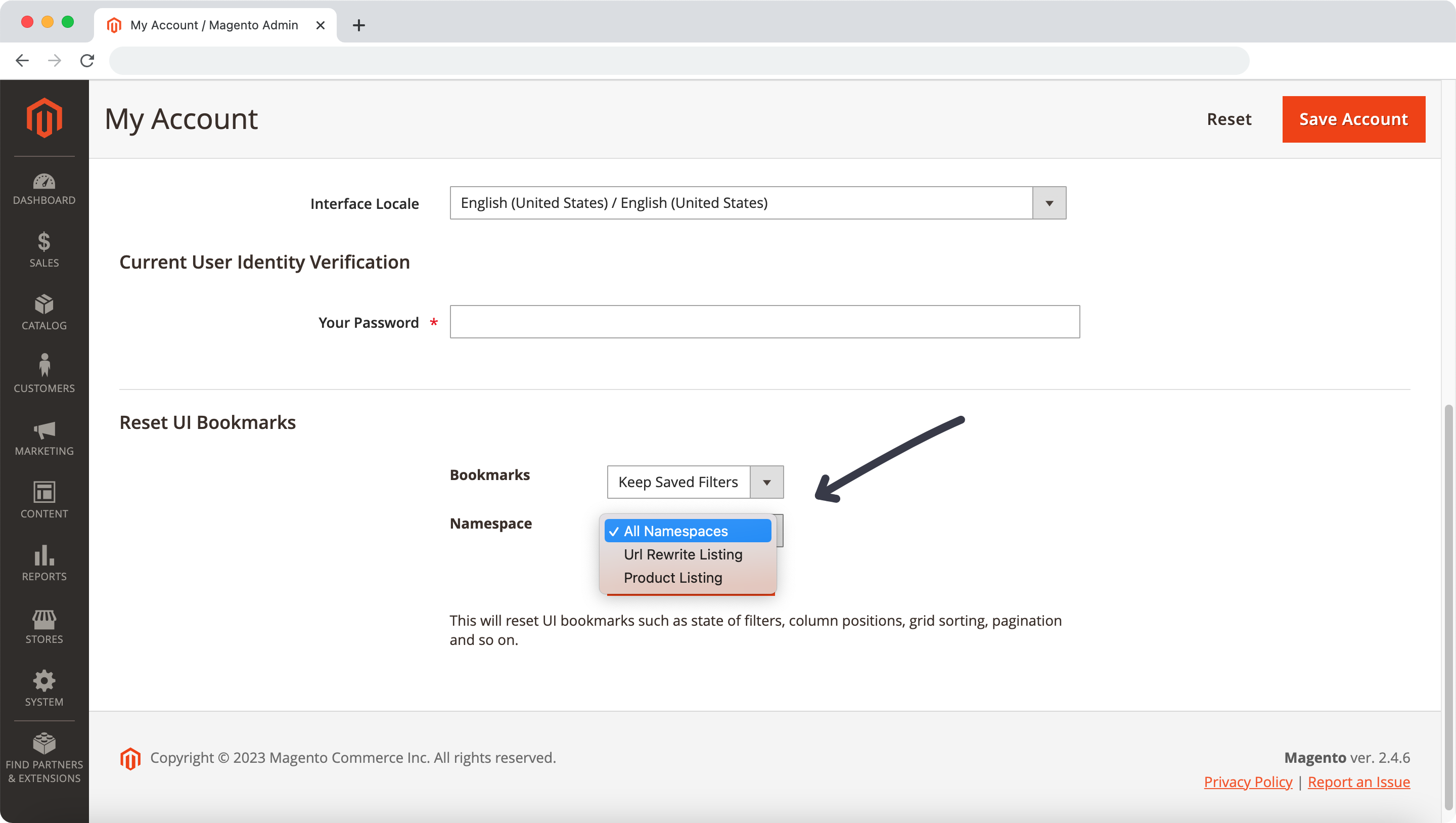
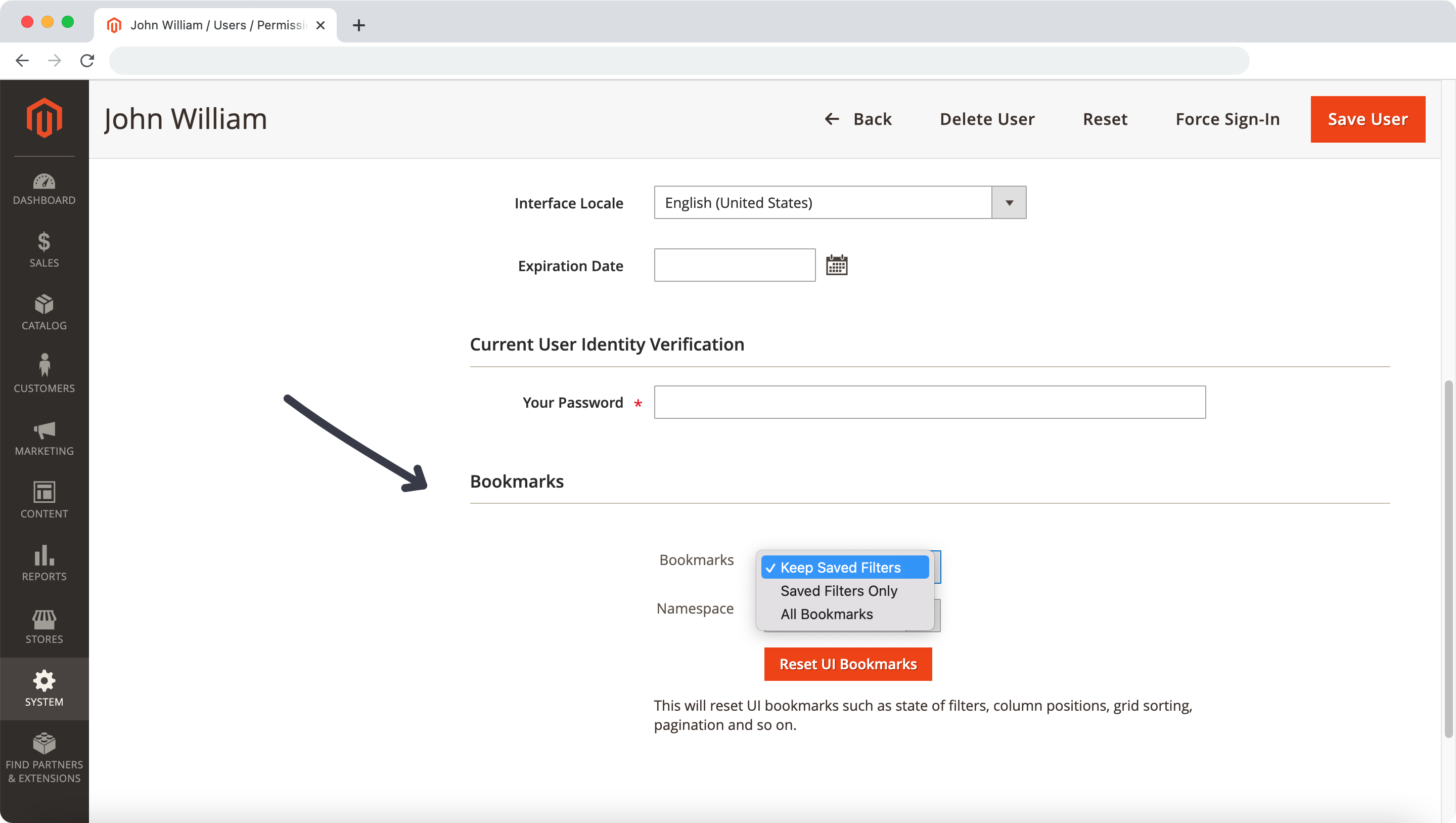
- A red button
Reset UI Bookmarkswithin yourAccount Settingspage as well as onSystem > Permissions > All Users > {User} > User Info. - Once a admin user hits the button
Reset UI Bookmarks, it will clear the history of state of filters, column positions or applied sorting which are stored in the MySQL tableui_bookmark. - Choose between the options
All Bookmarks,Saved Filters OnlyandKeep Saved Filters - Select a specific namespace such as
Product ListingorCustomer Listing. The dropdown is generated based on namespaces stored in theui_bookmarktable.
Usage
Simply hit the button Reset UI Bookmarks to clear the bookmarks and wait for the confirmation Your UI bookmarks were cleared successfully. After that all filters and grid settings are set back to default. More details are available in the attached user guide.
Support
If you experience any issues, don't hesitate to open an issue on Github.
Contact
Follow us on GitHub, Twitter and Facebook.
History
===== 1.3.2 =====
- Fix Call to a member function setData() on bool
===== 1.3.1 =====
- Declare class property to fix issue in PHP 8.2
===== 1.3.0 =====
- Namespace added so that you can clear bookmarks for a specific grid table
===== 1.2.2 =====
- 2.4.6 compatibility check
- Code cleanup
- Improved $form and $userId check
===== 1.2.1 =====
- Validation issue (
Cannot read properties of undefined (reading 'settings')) onSave Useraction fixed.
===== 1.2.0 =====
- ResetUiBookmarks Button added to
System > Permissions > All Users > {User} > User Infoso that bookmarks can be cleared for non-administrator users.
===== 1.1.2 =====
-
setup_version=""removed from module.xml
===== 1.1.1 =====
- 2.4.x compatibility added
- Cleanup various files to follow coding standard (EQP, ECG)
- Remove framework requirement in composer.json
===== 1.1.0 =====
- Choose between the options
All Bookmarks,Saved Filters OnlyandKeep Saved Filters
===== 1.0.3 =====
- Cleanup in
resetuibookmarks.phtml
===== 1.0.2 =====
- Magento 2.4.x compatibility added
===== 1.0.1 =====
- Magento 2.3.1 compatibility added
===== 1.0.0 =====
- Stable version
License
This content is fetched directly from the module's GitHub repository. We are not the authors of this content and take no responsibility for its accuracy, completeness, or any consequences arising from its use.