Magento 2 Grid Colors
shkoliar/magento-grid-colors
Adds extra coloring features to admin grids
Build Tests
Code Quality
Tested on Magento 2.4.8-p3
Recent Test History
Each release is tested against the latest Magento version at that time.
+4 older tests
Share This Module's Status
README
Loaded from GitHubMagento 2 Grid Colors
Overview
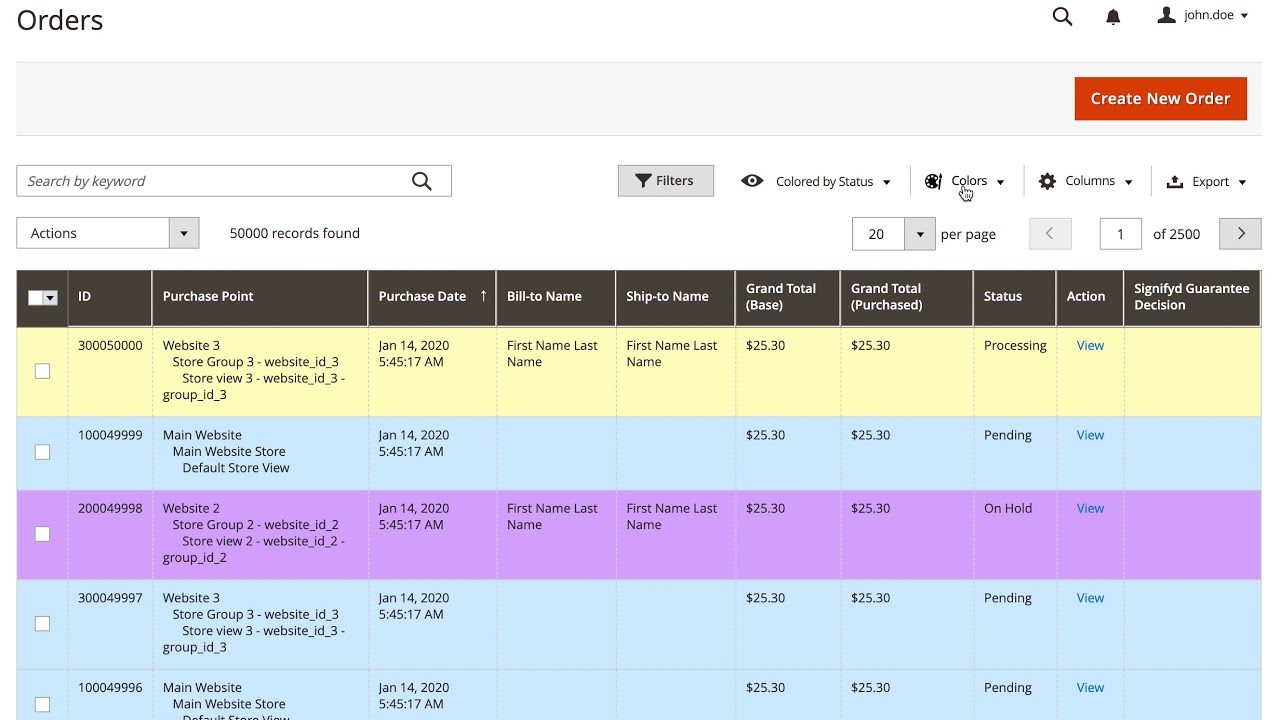
The module adds extra coloring features to admin grids at the Sales section. With help of this module, it is possible to define row color based on any column value which has pre-defined set of values. All coloring is applied dynamically and color configuration can be saved via Grid Bookmarks menu same as columns and filters configuration. Colorize grids with ease and preview results instantly!
Demo
Click on the image to watch the youtube video. Cmd + Click for macOS or Crtl + Click for Windows to open video in a new tab.
Installation
To install the Magento 2 Grid Colors module, simply run the command below:
composer require shkoliar/magento-grid-colors
To enable the module:
bin/magento module:enable Shkoliar_GridColors
Usage
After the module is installed and enabled, look for a new Colors element at Grid Actions section of Orders, Invoices, Shipments or Credit Memos pages of Sales section. To save the state of configured colors use Grid Bookmarks (Views) menu.
This content is fetched directly from the module's GitHub repository. We are not the authors of this content and take no responsibility for its accuracy, completeness, or any consequences arising from its use.